Termux is an Android terminal emulator and Linux environment application that works directly with no rooting or setup required. If you have a unused android phone, it’s easy to make it as a mini server.
Here is my experience about termux.
install
- install F-droid, link
- wait F-droid to update packages. after completely updated. search and install termux, termux::boot, termux::api
packages
pkg install sshd termux-services
sv-enable sshd
sv start sshd
pkg install termux-auth
set user passwd
Then you can ssh login your phone. the directory of termux is /data/data/com.termux/files/
Here are some packages I installed:
pkg install vim nginx termux-battery-status termux-api
it’s also a build environment. I also installed these:
pkg install dnsutils python cmake nlohmann-json ldd
I can send sms like this:
1 | termux-sms-send -n 95516 -s 0 aaa #use the first sim to send |
boot
you can add your own programs to start at boot. Here are steps how to do it:
mkdir ~/.termux/boot/
add a file under ~/.termux/boot/ containing this:
1
2
3
#!/data/data/com.termux/files/usr/bin/sh
termux-wake-lock
. $PREFIX/etc/profileMake your own pkg start as services
1
2
mkdir -p $PREFIX/var/service/<PKG>/log
ln -sf $PREFIX/share/termux-services/svlogger $PREFIX/var/service/<PKG>/log/runwrite a run script under $PREFIX/var/service/
, you can refer to some examples existed in $PREFIX/var/service/. here is an example:
1
2
#!/data/data/com.termux/files/usr/bin/sh
exec python3 /data/data/com.termux/files/home/sms-fwd/sms-fwd.py 2>&1 > /dev/nullSome sv commands:
1
2
3
sv up <PKG>
sv-enable <PKG>
sv-disable <PKG>
battery
as a mini server, I want this phone would run without my operations. I need to disable battery optimization of termux, here are some steps:
1 | 1. Navigate to Settings > Apps > Select your app. |
let phone charge automatically
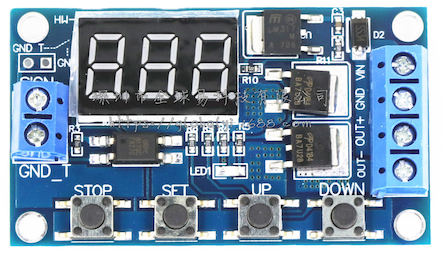
There are some methods to do this, you can remove the battery and connect a DC 3.85v power source to the board directly. or you can use a Relay to control charging 2 hours every day. There are many modules selling online.